Job Groups for RL#
Job Groups allow you to run multiple related tasks in parallel as a single managed unit. Unlike managed jobs which run tasks sequentially (pipelines), Job Groups launch all tasks simultaneously, enabling complex distributed architectures.

A SkyPilot Job Group for RL post-training. Five heterogeneous tasks run side by side: samples flow rollout → reward → buffer → trainer, and new policy weights loop back to the rollout server every step.#
Overview#
Key Features:
Parallel execution: Launch multiple tasks simultaneously, each running independently
Heterogeneous resources: Different resource requirements per task (e.g., GPUs for training, CPUs for data serving)
Automatic service discovery: Tasks discover each other and communicate via hostnames
Independent recovery: Each task recovers from preemptions without affecting other tasks
When to Use Job Groups:
Job Groups are ideal for workloads where multiple components with different requirements need to run together and communicate. Common use cases include:
RL post-training: Separate tasks for trainer, reward modeling, rollout server, and data serving
Parallel train-eval: Training and evaluation running in parallel with shared storage
Tip
Use Job Groups when your workload has heterogeneous tasks that need to run in parallel and communicate with each other. For homogeneous multi-node training within a single task, use distributed jobs instead. For sequential task execution, use managed job pipelines.
Creating a job group#
A Job Group is defined using a multi-document YAML file. The first document is the header that defines the group’s properties, followed by individual task definitions:
# job-group.yaml
---
# Header: Job Group configuration
name: my-job-group
execution: parallel      # Required: indicates this is a Job Group
---
# Task 1: Trainer
name: trainer
resources:
  accelerators: A100:1
run: |
  python train.py
---
# Task 2: Evaluator
name: evaluator
resources:
  accelerators: A100:1
run: |
  python evaluate.py
Launch the Job Group with:
$ sky jobs launch job-group.yaml
Header fields#
The header document supports the following fields:
Field |
Default |
Description |
|---|---|---|
|
Required |
Name of the Job Group |
|
Required |
Must be |
|
None |
List of task names that are “primary”. Tasks not in this list are “auxiliary” - long-running services (e.g., data servers, replay buffers) that wait for a signal to terminate. When all primary tasks complete, auxiliary tasks are terminated. If not set, all tasks are primary. |
|
None |
Delay before terminating auxiliary tasks when primary tasks complete,
allowing them to finish pending work (e.g., flushing data). Can be a
string (e.g., |
Each task document after the header follows the standard SkyPilot task YAML format.
Note
Every task in a Job Group must have a unique name. The name is used for service discovery and log viewing.
Service discovery#
Tasks in a Job Group can discover each other using hostnames. SkyPilot automatically configures networking so that tasks can communicate.
Hostname format#
Each task’s head node is accessible via the hostname:
{task_name}-0.{job_group_name}
For multi-node tasks, worker nodes use:
{task_name}-{node_index}.{job_group_name}
For example, in a Job Group named rlhf-experiment with a 2-node trainer task:
trainer-0.rlhf-experiment- Head node (rank 0)trainer-1.rlhf-experiment- Worker node (rank 1)
Environment variables#
SkyPilot injects the following environment variables into all tasks:
Variable |
Description |
|---|---|
|
Name of the Job Group |
Example usage in a task:
# Access the trainer task from the evaluator using the hostname
curl http://trainer-0.${SKYPILOT_JOBGROUP_NAME}:8000/status
Viewing logs#
View logs for a specific task within a Job Group:
# View logs for a specific task by name
$ sky jobs logs <job_id> trainer

# View logs for a specific task by task ID
$ sky jobs logs <job_id> 0

# View all task logs (default)
$ sky jobs logs <job_id>
When viewing logs for a multi-task job, SkyPilot displays a hint:
Hint: This job has 3 tasks. Use 'sky jobs logs 42 TASK' to view logs
for a specific task (TASK can be task ID or name).
Examples#
Parallel train-eval with shared storage#
This example runs training and evaluation in parallel, sharing checkpoints via a Kubernetes PVC volume:

Parallel training and evaluation with shared storage. The trainer saves checkpoints to a shared volume while the evaluator monitors and evaluates new checkpoints on-the-fly.#
---
name: train-eval
execution: parallel
---
name: trainer
resources:
  accelerators: A100:1
volumes:
  /checkpoints: my-checkpoint-volume
run: |
  python train.py --checkpoint-dir /checkpoints
---
name: evaluator
resources:
  accelerators: A100:1
volumes:
  /checkpoints: my-checkpoint-volume
run: |
  python evaluate.py --checkpoint-dir /checkpoints
See the full example in the SkyPilot repository.
RL post-training architecture#
This example demonstrates a distributed RL post-training architecture with 5 tasks (see the hero diagram at the top of the page). The trainer and rollout-server share a ReadWriteMany Kubernetes volume so the trainer can push freshly-updated policy weights back to the rollout-server every N steps, closing the RL feedback loop:
---
name: rlhf-training
execution: parallel
---
name: data-server
resources:
  cpus: 4+
run: |
  python data_server.py
---
name: rollout-server
num_nodes: 2
resources:
  accelerators: A100:1
volumes:
  /shared/policy: rlhf-policy
run: |
  python rollout_server.py
---
name: reward-server
resources:
  cpus: 8+
run: |
  python reward_server.py
---
name: replay-buffer
resources:
  cpus: 4+
  memory: 32+
run: |
  python replay_buffer.py
---
name: ppo-trainer
num_nodes: 2
resources:
  accelerators: A100:1
volumes:
  /shared/policy: rlhf-policy
run: |
  python ppo_trainer.py \
    --data-server data-server-0.${SKYPILOT_JOBGROUP_NAME}:8000 \
    --rollout-server rollout-server-0.${SKYPILOT_JOBGROUP_NAME}:8001 \
    --reward-server reward-server-0.${SKYPILOT_JOBGROUP_NAME}:8002 \
    --policy-sync-path /shared/policy/latest
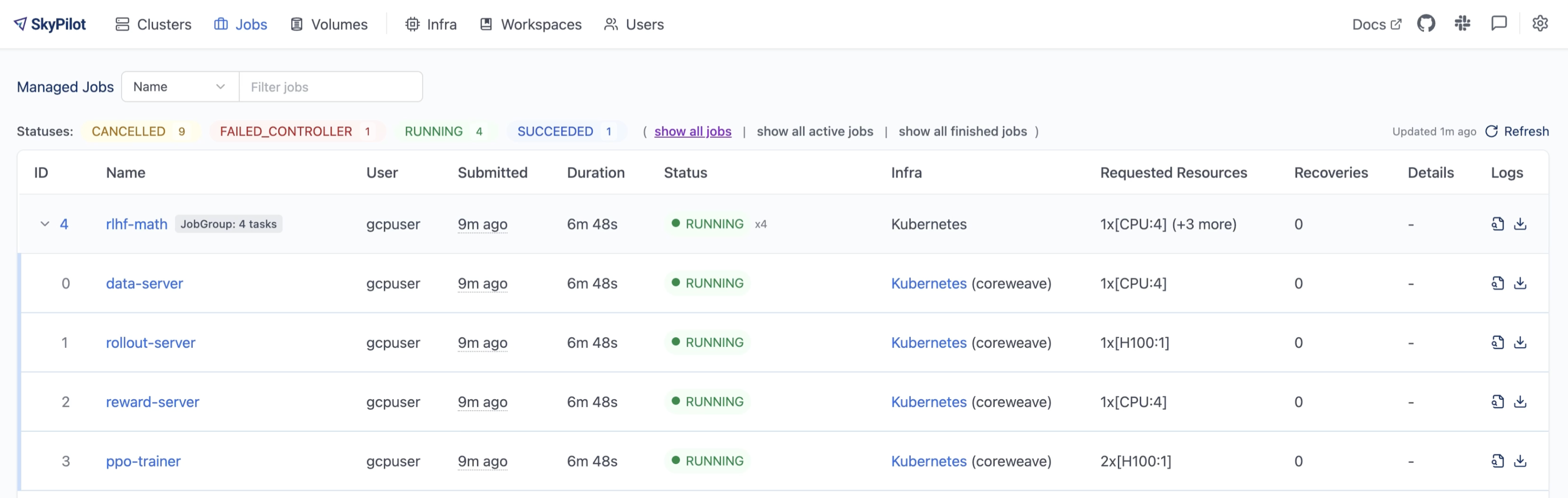
The same Job Group running in production, viewed from the SkyPilot dashboard. Each task has independent resources and can be monitored separately.#
See the full RL post-training example in the SkyPilot repository.
Primary and auxiliary tasks#
In many distributed workloads, you have a main task (e.g., trainer) and supporting services (e.g., data servers, replay buffers) that run indefinitely until the main task signals completion. These supporting services are “auxiliary tasks” - they don’t have a natural termination point and need to be told when to shut down.
Use primary_tasks to designate which tasks drive the job’s lifecycle. Auxiliary
tasks (those not listed) will be automatically terminated when all primary tasks
complete:
---
name: train-with-services
execution: parallel
primary_tasks: [trainer]      # Only trainer is primary
termination_delay: 30s        # Give services 30s to finish after trainer completes
---
name: trainer
resources:
  accelerators: A100:1
run: |
  python train.py             # Primary task: job completes when this finishes
---
name: data-server
resources:
  cpus: 4+
run: |
  python data_server.py       # Auxiliary: terminated 30s after trainer completes
When the trainer task finishes, the data-server (auxiliary) task will receive a termination signal after the 30-second delay, allowing it to flush pending data or perform cleanup.
Using the Python SDK#
Job Groups can also be created and launched entirely in Python using the SkyPilot SDK, instead of YAML files. See the Job Group SDK examples for more.
Here is a minimal example:
import sky

server = sky.Task(name='server', run='python3 -m http.server 8080')
server.set_resources(sky.Resources(cpus=2, infra='kubernetes'))

client = sky.Task(name='client', run='curl http://server-0.${SKYPILOT_JOBGROUP_NAME}:8080/')
client.set_resources(sky.Resources(cpus=2, infra='kubernetes'))

with sky.Dag() as dag:
    dag.add(server)
    dag.add(client)
dag.name = 'my-group'
dag.set_execution(sky.DagExecution.PARALLEL)

sky.stream_and_get(sky.jobs.launch(dag))
Current limitations#
Co-location: All tasks in a Job Group run on the same infrastructure (same Kubernetes cluster or cloud zone).
Networking: Service discovery (hostname-based communication between tasks) currently only works on Kubernetes. On other clouds, tasks can run in parallel but cannot communicate with each other using the hostname format.
Note
Job Groups require execution: parallel in the header. For sequential task
execution, use managed job pipelines instead (omit the
execution field or set it to serial).
See also
Managed Jobs for single tasks or sequential pipelines.
Distributed Multi-Node Jobs for multi-node distributed training within a single task.