Source: examples/deepseek-ocr
Scaling Document OCR Batch Inference with DeepSeek and SkyPilot Pools#
This example demonstrates how to use DeepSeek OCR with SkyPilot’s pools feature to process large volumes of scanned documents in parallel.
See the blog post for a detailed walkthrough.
Use case#
Enterprise AI systems like RAG-based tools often struggle with scanned documents and images because traditional OCR loses document structure. DeepSeek OCR uses vision-language models to:
Preserve tables and multi-column layouts
Output clean markdown
Handle mixed content without losing structure
Perform context-aware text recognition
This example shows how to scale DeepSeek OCR processing across multiple GPU workers using SkyPilot pools.
Prerequisites#
Kaggle API credentials (
~/.kaggle/kaggle.json)S3 bucket for output storage
Quick start: Single-node testing#
For quick testing on a single node without pools, create a test-single.yaml YAML that combines setup with a simple run command:
# test-single.yaml
resources:
  accelerators: L40S:1

file_mounts:
  ~/.kaggle/kaggle.json: ~/.kaggle/kaggle.json
  /outputs:
    source: s3://my-skypilot-bucket

workdir: .

setup: |
  # Same setup as pool.yaml
  sudo apt-get update && sudo apt-get install -y unzip
  uv venv .venv --python 3.12
  source .venv/bin/activate
  git clone https://github.com/deepseek-ai/DeepSeek-OCR.git
  cd DeepSeek-OCR
  pip install kaggle
  uv pip install torch==2.6.0 torchvision torchaudio --index-url https://download.pytorch.org/whl/cu118
  uv pip install vllm==0.8.5
  uv pip install flash-attn==2.7.3 --no-build-isolation
  uv pip install -r requirements.txt
  cd ..
  kaggle datasets download goapgo/book-scan-ocr-vlm-finetuning
  unzip -q book-scan-ocr-vlm-finetuning.zip -d book-scan-ocr
  echo "Setup complete!"

run: |
  source .venv/bin/activate
  # Process all images on a single node
  python process_ocr.py --start-idx 0 --end-idx -1
Then launch with:
sky launch -c deepseek-ocr-test test-single.yaml
Note: Processing the entire dataset on a single node will be slow. Use pools (below) for production workloads.
Scaling with pools#
Step 1: Create the pool#
sky jobs pool apply -p deepseek-ocr-pool pool.yaml
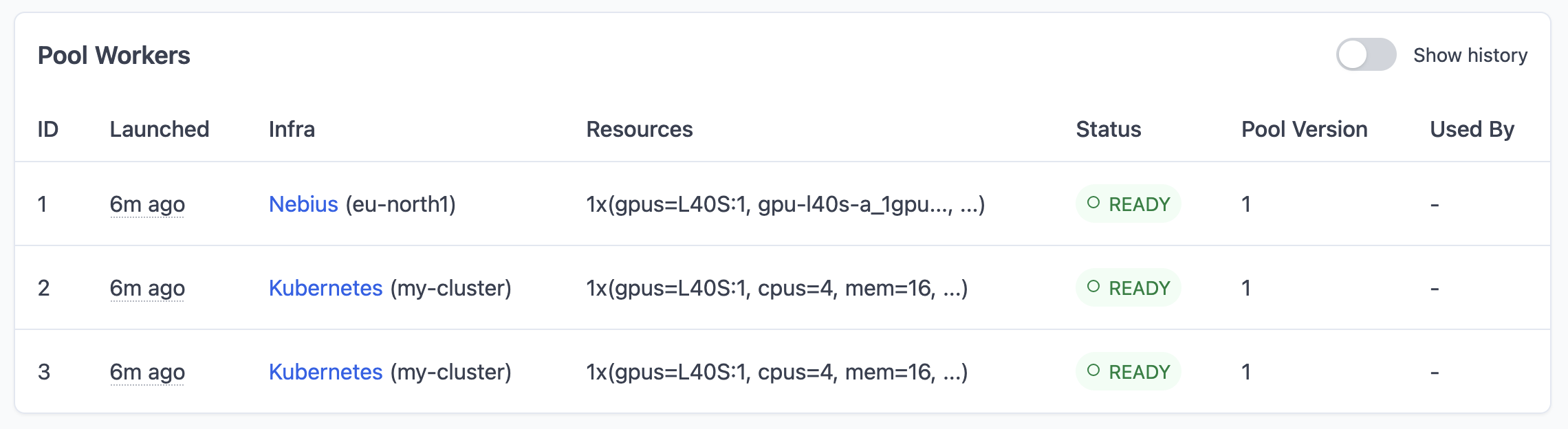
This spins up 3 GPU workers (workers: 3) with DeepSeek OCR and the dataset pre-loaded.
Step 2: Check pool status#
sky jobs pool status deepseek-ocr-pool
Wait for all workers to show READY status.
Step 3: Submit batch jobs#
sky jobs launch --pool deepseek-ocr-pool --num-jobs 10 job.yaml
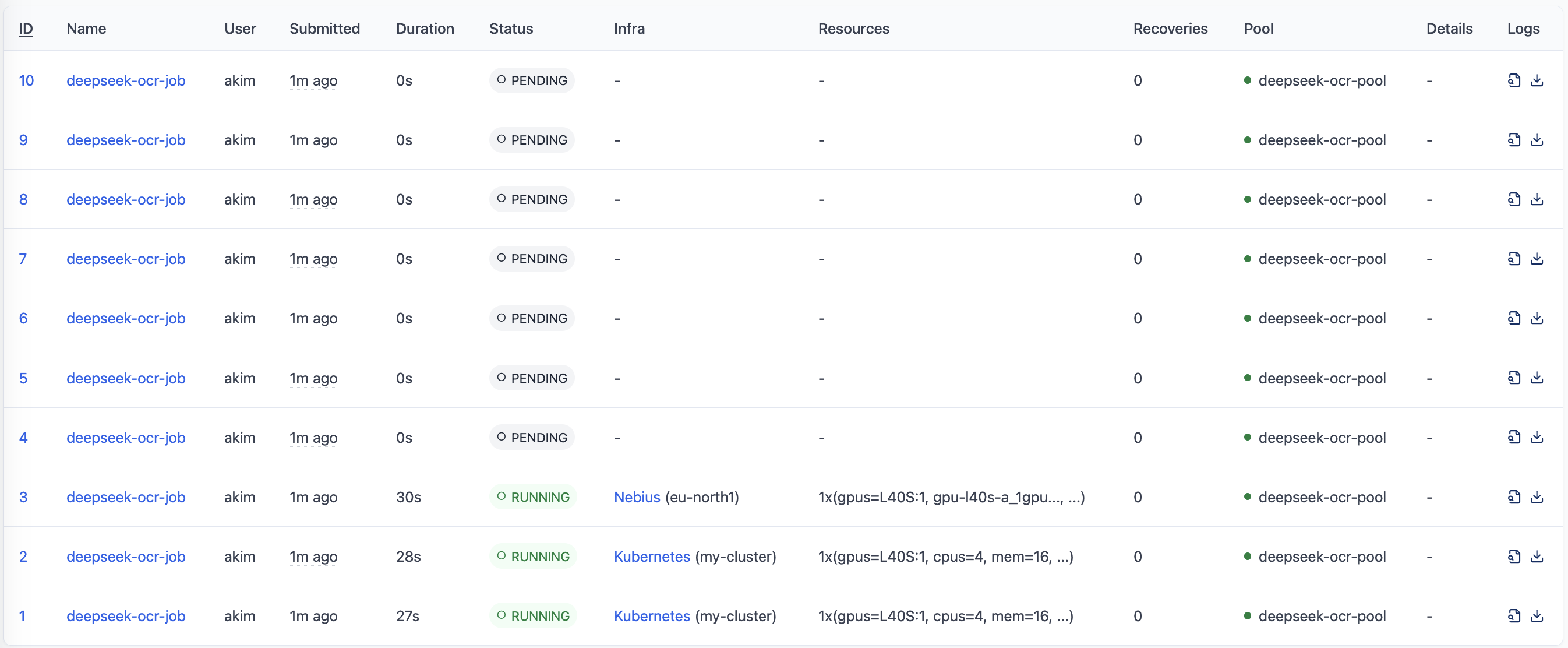
This submits 10 parallel jobs to process the entire dataset. Four will start immediately (one per worker), and the rest will queue up.
Step 4: Monitor progress#
View the dashboard:
sky dashboard
Check job queue:
sky jobs queue
View logs:
sky jobs logs <job-id>
Step 5: Scale as needed#
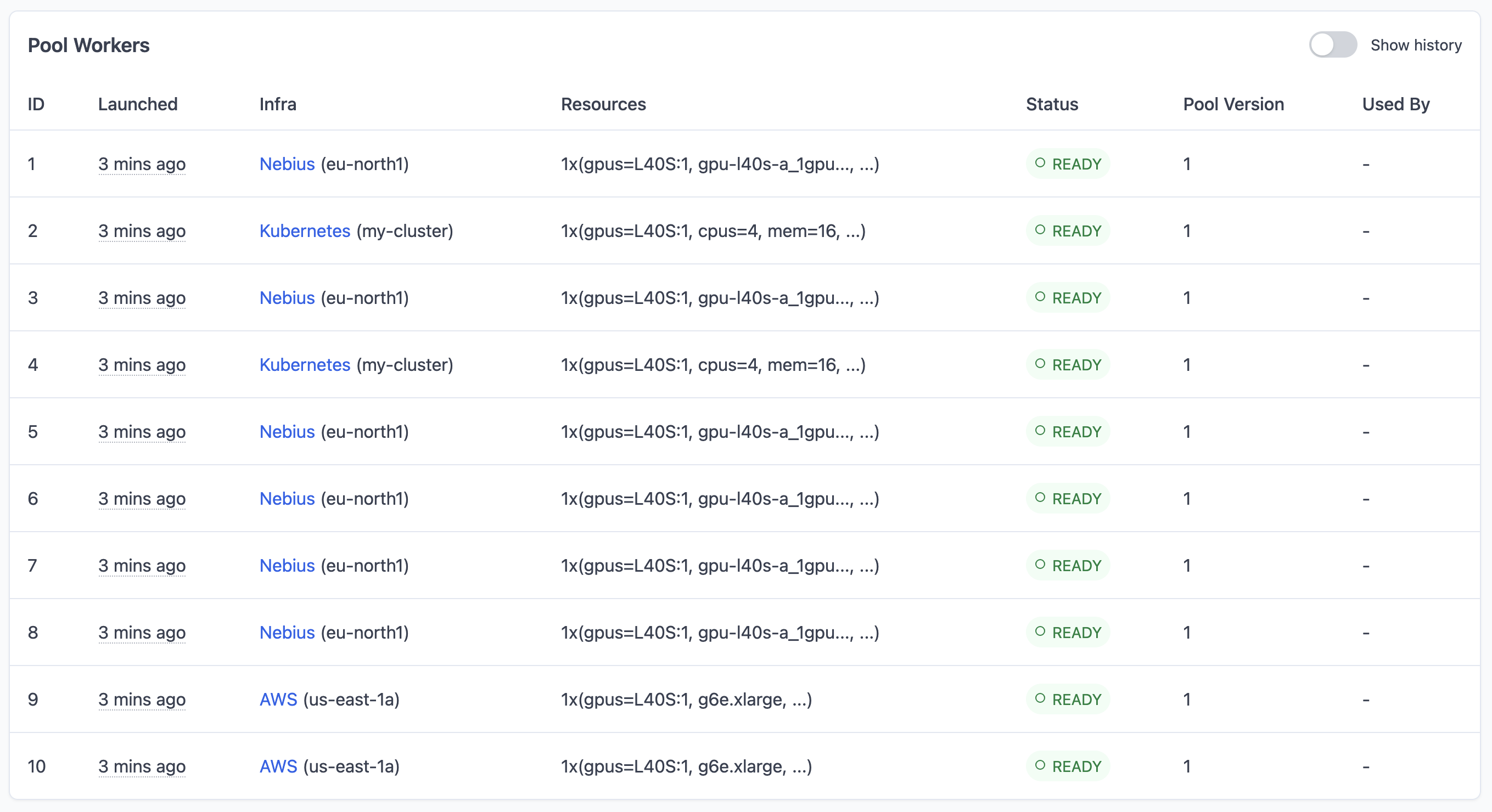
To process faster, scale up the pool:
sky jobs pool apply --pool deepseek-ocr-pool --workers 10
sky jobs launch --pool deepseek-ocr-pool --num-jobs 20 job.yaml
Step 6: Cleanup#
When done, tear down the pool:
sky jobs pool down deepseek-ocr-pool
How it works#
Pool configuration (pool.yaml)#
The pool YAML defines the worker infrastructure:
Workers: Number of GPU instances
Resources: L40S GPU per worker
File mounts: Kaggle credentials and S3 output bucket
Setup: Runs once per worker to install dependencies and download the dataset
Job configuration (job.yaml)#
The job YAML defines the workload:
Resources: Must match pool resources (L40S GPU)
Run: Processes assigned chunk of images on each job
Work distribution#
SkyPilot automatically distributes work using environment variables:
$SKYPILOT_JOB_RANK: Current job index (0, 1, 2, …)$SKYPILOT_NUM_JOBS: Total number of jobs
The bash script in the run section calculates which images each job should process based on these variables.
Output#
Results are synced to the S3 bucket specified in file_mounts:
s3://my-skypilot-bucket/ocr_results/
├── image_001.md
├── image_001_ocr.json
├── image_002.md
├── image_002_ocr.json
└── ...
References#
Included files#
job.yaml
name: deepseek-ocr-job

resources:
  accelerators: L40S:1

run: |
  # Calculate job range using SKYPILOT_JOB_RANK and SKYPILOT_NUM_JOBS
  source .venv/bin/activate
  echo "Job rank: ${SKYPILOT_JOB_RANK}/${SKYPILOT_NUM_JOBS}"

  # Count total images in the dataset
  IMAGE_DIR=./book-scan-ocr/Book-Scan-OCR/images
  TOTAL_IMAGES=$(find ${IMAGE_DIR} -name "*.jpg" -o -name "*.png" | wc -l)
  echo "Total images: ${TOTAL_IMAGES}"

  # Calculate start and end indices for this job
  CHUNK_SIZE=$((TOTAL_IMAGES / SKYPILOT_NUM_JOBS))
  REMAINDER=$((TOTAL_IMAGES % SKYPILOT_NUM_JOBS))

  # Calculate start index
  START_IDX=$((SKYPILOT_JOB_RANK * CHUNK_SIZE))
  if [ ${SKYPILOT_JOB_RANK} -lt ${REMAINDER} ]; then
    START_IDX=$((START_IDX + SKYPILOT_JOB_RANK))
    CHUNK_SIZE=$((CHUNK_SIZE + 1))
  else
    START_IDX=$((START_IDX + REMAINDER))
  fi

  END_IDX=$((START_IDX + CHUNK_SIZE))

  echo "Processing images ${START_IDX} to ${END_IDX}"

  # Pass indices to Python script via CLI arguments
  python process_ocr.py --start-idx ${START_IDX} --end-idx ${END_IDX}
  echo "Job complete! Results saved to S3 bucket."
pool.yaml
pool:
  workers: 3

resources:
  accelerators: L40S:1


file_mounts:
  ~/.kaggle/kaggle.json: ~/.kaggle/kaggle.json
  /outputs:
    source: s3://my-skypilot-bucket

workdir: .

setup: |
  # Setup runs once on all workers (must be non-blocking)
  sudo apt-get update && sudo apt-get install -y unzip
  uv venv .venv --python 3.12
  source .venv/bin/activate
  git clone https://github.com/deepseek-ai/DeepSeek-OCR.git
  cd DeepSeek-OCR
  pip install kaggle
  uv pip install torch==2.6.0 torchvision torchaudio --index-url https://download.pytorch.org/whl/cu118
  uv pip install vllm==0.8.5
  uv pip install flash-attn==2.7.3 --no-build-isolation
  uv pip install -r requirements.txt
  cd ..
  # Download dataset during setup (shared across all jobs)
  kaggle datasets download goapgo/book-scan-ocr-vlm-finetuning
  unzip -q book-scan-ocr-vlm-finetuning.zip -d book-scan-ocr

  echo "Setup complete!"
process_ocr.py
"""
DeepSeek OCR Image Processing Script
Processes images from the Book-Scan-OCR dataset.
"""

import argparse
import json
from pathlib import Path

import torch
from transformers import AutoModel
from transformers import AutoTokenizer


def main():
    parser = argparse.ArgumentParser(description='Process OCR on image dataset')
    parser.add_argument('--start-idx', type=int, required=True)
    parser.add_argument('--end-idx', type=int, required=True)
    args = parser.parse_args()

    print(f"Processing range: {args.start_idx} to {args.end_idx}")

    # Load DeepSeek OCR model
    model_name = "deepseek-ai/deepseek-ocr"
    tokenizer = AutoTokenizer.from_pretrained(model_name,
                                              trust_remote_code=True)

    if tokenizer.pad_token is None:
        tokenizer.pad_token = tokenizer.eos_token

    model = AutoModel.from_pretrained(model_name,
                                      _attn_implementation='flash_attention_2',
                                      trust_remote_code=True,
                                      use_safetensors=True)
    model = model.eval().cuda().to(torch.bfloat16)

    # Find and slice images
    image_dir = Path.cwd() / "book-scan-ocr" / "Book-Scan-OCR" / "images"
    output_dir = Path("/outputs/ocr_results")
    output_dir.mkdir(parents=True, exist_ok=True)

    all_image_files = sorted(image_dir.glob("*.jpg")) + sorted(
        image_dir.glob("*.png"))
    image_files = all_image_files[args.start_idx:args.end_idx]

    print(f"Processing {len(image_files)} images...")

    results = []
    for idx, img_path in enumerate(image_files, 1):
        print(f"Processing {idx}/{len(image_files)}: {img_path.name}...")

        try:
            # Run OCR with grounding tag for structure awareness
            prompt = "<image>\\n<|grounding|>Convert the document to markdown. "
            image_output_dir = output_dir / img_path.stem
            image_output_dir.mkdir(exist_ok=True)

            ocr_result = model.infer(tokenizer,
                                     prompt=prompt,
                                     image_file=str(img_path),
                                     output_path=str(image_output_dir),
                                     base_size=1024,
                                     image_size=640,
                                     crop_mode=True,
                                     save_results=True,
                                     test_compress=True)

            # Read the markdown result
            mmd_file = image_output_dir / "result.mmd"
            if mmd_file.exists():
                with open(mmd_file, 'r', encoding='utf-8') as f:
                    ocr_text = f.read()
            else:
                ocr_text = "[OCR completed but result not found]"

            # Save consolidated markdown at top level
            md_file = output_dir / f"{img_path.stem}.md"
            with open(md_file, 'w', encoding='utf-8') as f:
                f.write(f"# {img_path.name}\\n\\n{ocr_text}\\n")

            # Save JSON metadata
            result = {"image_name": img_path.name, "ocr_text": ocr_text}
            results.append(result)

            json_file = output_dir / f"{img_path.stem}_ocr.json"
            with open(json_file, 'w', encoding='utf-8') as f:
                json.dump(result, f, indent=2, ensure_ascii=False)

            print(f"Saved markdown to {md_file}")

        except Exception as e:
            print(f"Error processing {img_path.name}: {e}")
            results.append({"image_name": img_path.name, "error": str(e)})

    # Save batch summary
    summary_file = output_dir / f"results_{args.start_idx}_{args.end_idx}.json"
    with open(summary_file, 'w', encoding='utf-8') as f:
        json.dump(results, f, indent=2, ensure_ascii=False)

    # Print summary
    successful = sum(1 for r in results if "error" not in r)
    print(f"\\n{'='*60}")
    print(f"Processing complete!")
    print(
        f"Total: {len(results)} | Successful: {successful} | Failed: {len(results) - successful}"
    )
    print(f"Results saved to {output_dir}")
    print('=' * 60)


if __name__ == "__main__":
    main()